

LumenJS deep dive — Lazy Hydration
This article is part of the LumenJS deep dive series a series about the architectural decisions behind LumenJS, an open-source full-stack web framework designed for agent-driven development.
Every component on a page costs JavaScript. Most of the time that cost is invisible. But on content-heavy pages (blog posts, dashboards, feeds), it adds up. You end up shipping and executing code for components the user may never scroll to.
Lazy hydration solves that.
Lazy Hydration
Wrap any component in

Everything outside
Hydration strategies
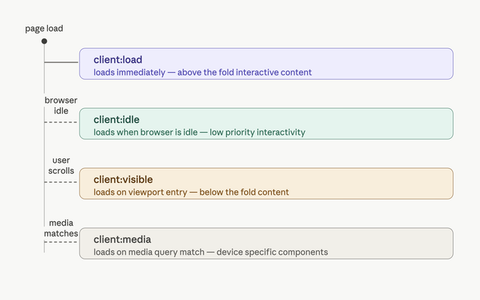
Four strategies, each with a clear purpose.
client:load - loads immediately on page load. Use it for interactive content visible on first paint.
client:visible - defers loading until the component scrolls into the viewport. A comments block, a reactions widget, a heavy chart none of them need JavaScript until the user actually reaches them.
client:idle - loads when the browser is idle. Good for low-priority components that should hydrate soon but are not critical for first interaction.
client:media - loads only when a CSS media query matches. Perfect for components whose JavaScript is only useful at certain screen sizes, a desktop sidebar, a mobile-only drawer.
How it works
When the chosen strategy triggers, the module is dynamically imported and the custom element registers itself. From that point on, the component behaves like any other element on the page.
No config flag. No setup. The runtime is included on every page and only activates when
Escape hatches
A few details matter once you start using islands in real pages.
data-hydrated lands on the element once the module loads. Useful for E2E tests waiting on hydration, for CSS that should only apply after the component is live, and for debugging which islands have fired.
island-hydrated is a bubbling, composed event dispatched at the same moment. Listen for it on any ancestor when you need to chain behavior: preload an analytics module, kick off a second island, mark a region as ready.
window.__nk_islands is a registry the runtime checks before doing a dynamic import. If a host has populated it with a loader for the import path, the island uses that loader. Otherwise the runtime falls back to import(path). This gives a project an escape hatch to wire islands into its bundle graph instead of relying on raw URL imports.
In practice
A content-heavy page where the reactions widget only loads when the user scrolls to it:
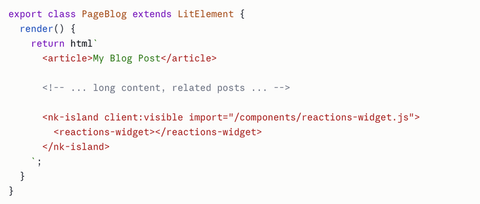
The page renders fully on the server. The article content hydrates immediately. The reactions widget waits. First paint is fast, interaction cost is deferred.
Composing with component loaders
LumenJS lets any Lit component, not just a page, export its own loader(). The data is fetched server-side, stripped from the client bundle, and inlined into the SSR'd HTML. The component owns its data dependency.
Pair that with an island and the two principles compose on a single component. The component loader runs on the server and produces the reactions count. The widget is rendered into HTML with that data and shipped. No client JavaScript. When the user reaches the widget, the island imports its module, the element registers, and the component takes over the SSR'd region, now interactive.
Server work runs only for pages that include the widget. Client JavaScript runs only for users who scroll to it. Each layer defers what it controls. The page composes them.
Conclusion
Lazy hydration in LumenJS is one custom element,
The cost is not free. Each island adds a custom element to the DOM and, depending on the strategy, an observer or listener until the trigger fires. For above-the-fold critical UI, plain hydration is faster: the JS would have shipped anyway, and the extra element is overhead. The win shows up below the fold, on long pages, where most of the component tree is JavaScript the user may never reach.
Lazy hydration is not a default. It is a tool you reach for when a component does not need its JavaScript on first paint. Used in the right places, the page becomes lighter without the user noticing anything changed.