

The workflow around our coding agent
Green pipeline, wrong change. What we changed in the workflow around our coding agent after the first ticket.
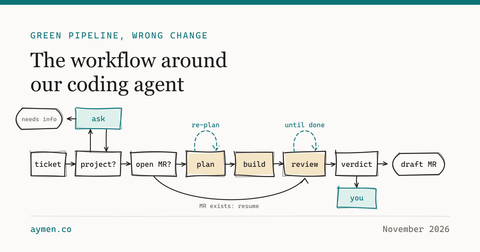
The first ticket that our agent platform turned into a merge request looked good. The pipeline was green, and the agent had fixed some broken tests by itself.
Then we reviewed the changes outside the platform. The agent had also changed other buttons, and nobody had asked for that. The pipeline was green, but the change was wrong.
After this ticket, we changed the workflow around the agent.
The workflow we run
A workflow like this is a graph: each step is a node, and the arrows between the steps decide what happens next. A node can be plain code, a call to a model, or a full coding agent.
When a ticket comes in, the intake step reads it and the plan step writes down what will change. The build step then starts a coding agent in its own container, with a copy of the code. The agent works on a branch, pushes its changes and waits for the pipeline. After that, a verdict step checks the result of the pipeline, a review step reads the changes, and the last step opens a draft merge request for me to review.
The verdict step checks the pipeline again
The build agent fixes the parts that fail, and then it reports that the pipeline is green. The verdict step ignores this report and checks the pipeline again with plain code, without a model.
We use the same rule for visual checks. We put some mistakes in a button on purpose: a wrong colour, a typo in the label, and a wrong height. The vision models found the colour and the typo, but they all missed the height. So code measures the sizes and compares them with the values in the design.
Shared steps, and one small workflow per project
Our first workflow worked well for the design system. When I wanted to use it for a second project, it did not work, because we had built every rule of the first project into its steps.
So we split the workflow into two layers. The first layer contains the steps that every project needs: intake, plan, build, pipeline verdict, review, and finish. The second layer is one short workflow for each project. It does no work itself. It calls the shared steps in order and gives them the settings of the project: the repository, the branch, the checks, and whether it may merge or only open a draft.
Now a new project needs only a new set of settings.
Another option was to keep these settings in a file inside each repository. I refused this option, because a repository should not be able to change the rules that apply to it.
What the model decides
For every step, we ask one question: does the model decide here, or does the workflow decide?
For some work, we know all the steps in advance. A design-system task is an example. The design gives the values, and the checks are always the same. So we draw every step, and the model only does the work inside each step.
For other work, we do not know the steps in advance. A bug report can concern one file or many files, in the front end or in the back end. So we give the agent a goal, a copy of the code, and a check that tells it when the work is done. The agent chooses how to reach the goal.
The person who draws the workflow still owns the goal, the check that says the work is done, and the way out for a run that cannot finish.
A cheaper run that did the same job
We ran the same ticket through the same planning step two times.
The first run was expensive, and most of the cost was waste. The platform sent the whole conversation again on every call. The planner loaded skills that it did not need, and it tried to download a ticket that it already had.
So we added rules around the step: use the ticket that is already in the prompt, explore a little and then write, and load only the skills that the task needs. We also moved to a cheaper model.
The second run cost a small part of the first run, and it did the same job. It found the same fix, in the same files.
Retries, loops and early stops
The retry. When the pipeline fails, the build step tries again, but only a limited number of times. Without a limit, a flaky test and a model that keeps trying can run for a long time and cost a lot of money.
The loop. We had a loop that did not stop. The work was finished, but the build started again and marked the ticket as failed. We changed the loop so that it stops on the decision of the review, and each round starts from a clean state.
The early stop. Before the agent writes any code, a ticket can stop with the result "needs info", for example when no project fits. The ticket then goes to a person, and the run does not fail.
The human is a step too
I am also a step in this workflow, and I am the slowest step. I receive a draft merge request, the result of the pipeline, and a review, and I decide whether to merge it.
The design-system workflow already takes some components from the ticket to the accepted result without any person. It still stops for me when a visual change needs a new reference image, and when code goes into the main branch. I keep these decisions for myself.
The extra buttons from the first ticket passed every step of the platform, and only a review outside the platform found them.
I still read every diff.